This guide walks one fence job from the tape measure to the quote. The job is a 220 ft wood privacy fence around a backyard: a 60 ft side, a 100 ft back and another 60 ft side, 6 ft tall, no gate. Every count in it comes from Visual Fence Pro itself, from the product it starts you with and the parts list it printed for the job, and every rule it quotes links to where it comes from.
It gives you no prices to use. What a post, a bag of concrete or a crew day costs you depends on your supplier, your area and the week you buy, and your own numbers are the only ones that belong in your estimate. So the parts table below leaves a column for them.
The Site Visit: Measure Every Run
The estimate starts at the site visit. Whatever you don't write down there, you guess later at your desk, and a guess can cost you money in either direction.
What to Measure
Measure each straight run on its own: every stretch between corners, ends and gates. One total isn't enough, because each run gets counted on its own later, and the example below shows how that changes the order.
- Each run's length — A measuring wheel for long stretches, a tape near the house and other structures.
- Gates — Every opening, its width, and whether the homeowner wants a walk gate or a double drive gate. A gate brings its own posts, hardware and labor.
- Corners and ends — Every spot where the fence turns or stops.
- Height — Confirm it. The height decides the post length, the number of rails and the picket length.
Grade Changes and Terrain
On a slope, a fence is either racked (the sections tilt to follow the ground) or stepped (level sections that step down the hill). Both take more time, and stepping can need longer posts on the low side. Walk the whole line and write down where the ground changes.
Obstacles and Site Conditions
- Trees and roots — Big roots on the line can force you to move a post or dig by hand.
- Rock and hard ground — Probe a few spots with a bar, or ask the homeowner what they have hit before. Rock can turn an auger job into a hand-digging job.
- An old fence to tear out — Price the tear-out as its own line, not folded into the install.
- Access — Can the truck reach the backyard, or does everything go through a side gate? Narrow access means carrying every bundle, and it can rule out a machine-mounted auger.
Call 811 before you dig
The service calls itself the free national before-you-dig service
, and its site asks you to contact it, or your state's center, a few business days before you begin any digging, including common projects like planting trees and shrubs or installing fences and mailboxes
. Then wait until the lines are marked: it says to make sure all utilities have indeed responded to your request before breaking ground
.
Source, checked : 811 Before You Dig, a Common Ground Alliance initiative.
The Parts List: Count It Run by Run
Here is the example job in the app, on its sketch grid. Run A is 60 ft, run B is 100 ft and run C is 60 ft: 220 ft in all.
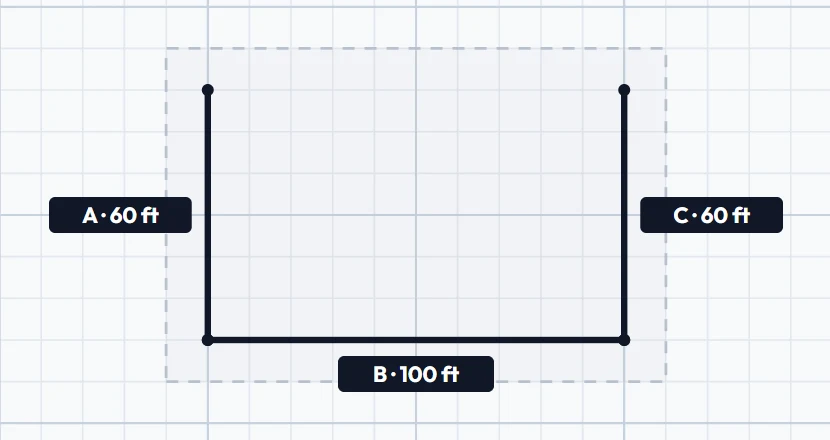
The fence is the product the app starts you with when you press + New Product on the Products page (or its dashed Add Product card): a 6 ft cedar Dog Ear privacy fence on 4×4 pressure-treated posts, built in 8 ft sections (96 in from the center of one post to the center of the next). It is priced by its parts: on the Products page you enter what your supplier charges you for each one, and every cost starts at zero.
Count Sections Run by Run
A fence goes up a section at a time (the app calls them panels), so count sections for each run, not for the whole job. Runs A and C are each 7.5 sections long, and the app counts 8 for each, rounding the short last section up to a whole one. Run B is 12.5 sections long, and the app counts 13. That's 29 sections, where dividing the whole 220 ft by 8 would have given 27.5.
The posts follow the sections: one at the start of each section, plus one where the fence ends, so 30. Where two runs meet at a corner they share one post, and the app counts it once.
One Section's Parts
The product lists what one section takes, and the app multiplies it by the sections:
- Posts: 4×4 pressure-treated, 8 ft long. The Products page sets each post 2 ft in the ground unless you pick another depth (it offers 2, 3 or 4 ft), and works the post length out from it: 6 ft of fence plus 2 ft in the ground is an 8 ft post.
- Rails: 3 per section, 2×4, 8 ft long.
- Pickets: 17 per section, 1×6 cedar (5.5 in wide). Why 17: a section is 96 in from post center to post center, which leaves 92.5 in between two 4×4 posts (a 4×4 is 3.5 in thick). 16 pickets cover 88 in and leave 4.5 in open, so one more picket, ripped to fit, closes the gap. You still buy it.
- Rail brackets: 6 per section, 2 per rail.
- Deck screws: 1 box per section.
- Concrete: 2 bags (50 lb) per post.
- Labor: 1 install line per section.
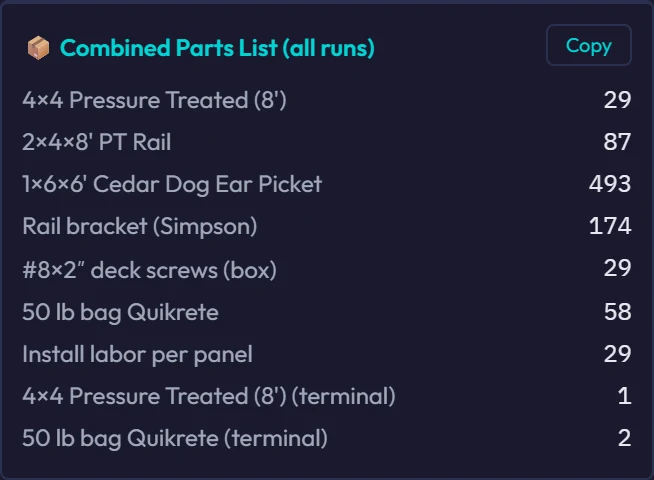
The same list, with a column for your prices:
| Part (as the app lists it) | Qty | Your price |
|---|---|---|
| 4×4 Pressure Treated (8') | 29 | |
| 2×4×8' PT Rail | 87 | |
| 1×6×6' Cedar Dog Ear Picket | 493 | |
| Rail bracket (Simpson) | 174 | |
| #8×2″ deck screws (box) | 29 | |
| 50 lb bag Quikrete | 58 | |
| Install labor per panel | 29 | |
| 4×4 Pressure Treated (8') (terminal) | 1 | |
| 50 lb bag Quikrete (terminal) | 2 |
The two (terminal) lines are the post where the fence ends and its concrete. Each run also gets a parts list of its own in the app, and the Copy button on the combined list copies it as text, ready for your supplier.
Two more things about these counts. They are for a product priced by its parts. If you price a product by the foot instead, the app counts some parts, the pickets among them, to each run's exact length, so its list comes out different. And to change a count on one job, use Edit Materials in the estimator: it changes that quote only, and your product keeps its own counts.
Let the app do the counting.
Visual Fence Pro counts the parts while you draw the fence on a satellite photo or on the sketch grid, from your own products. Try it free for 14 days.
Start Your Free TrialLabor: Use Your Own Crew's Numbers
Price labor from what your own crew does, not from someone else's averages. On every job, write down:
- How many feet of fence the crew set each day, by fence type and height.
- What slowed them down: a slope, rock, tight access, a lot of corners, gates, an old fence to tear out.
- Anything the job needed that the estimate didn't have.
That record is what makes your next estimate right. If you know what a crew day costs you with everything in it (wages, payroll taxes, workers' comp, the truck, wear on the equipment), multiply it by the days the job will take.
What fence installers are paid
The U.S. Bureau of Labor Statistics put the national median wage of fence erectors (occupation 47-4031) at $23.07 an hour in May 2025: half were paid more, half less. That is the wage alone. It is not what an hour of your crew costs you, and not a price to charge: payroll taxes, workers' comp, the truck and the tools come on top, and pay in your area can be higher or lower.
Source, checked : National Wages: Fence Erectors, O*NET OnLine (U.S. Department of Labor), which shows the Bureau of Labor Statistics' figures.
In the example, labor is one of the product's own lines, Install labor per panel, one for each section.
Pricing and Markup: Cover Your Costs First
Knowing your costs is half of it. Your price also has to carry the business and leave a profit.
Cost-Plus
Add up what the job costs you, materials and labor, then add your markup. It is simple and consistent. Its weakness is that it ignores what the market will pay: high costs can price you out of a bid, and low ones can leave money on the table.
Market Rate
Know what other contractors near you charge per foot for the same fence, and price to that, as long as it still clears your costs.
Work out both and bid the higher. If the market rate comes in below what the job costs you, pass on the job or find a way to bring your costs down. Don't bid below your cost to win work.
Overhead
Your markup also has to cover the business itself: truck payments, insurance, office rent, software, advertising, fuel, tool replacement and your own pay. What's left after all of it is your profit. In Visual Fence Pro, your markup and labor rate live in Settings, and the app adds them on top of the costs on your products.
Building the Quote
A quote is a sales tool, not just a price. The homeowner may be comparing you with other contractors, and how clear and complete your quote is shapes what they think of you.
Line Items or Lump Sum
Line items show what the customer is paying for, which can build trust. They also invite line-by-line haggling, and some customers may price your materials against a big-box store without seeing the difference in grade or delivery.
A lump sum is simpler and harder to pick apart, but some customers read it as less open.
A middle way: list the main pieces (the fence run by run, each gate, the tear-out) with a price for each, without splitting material from labor inside them.
What Every Quote Should Include
- Your company name, logo, license number (where your state licenses fence work) and contact details
- The customer's name and the property address
- A scope of work that says exactly what's included
- The materials: style, height, material and color
- The total footage, and every gate
- Itemized prices, or a clear total
- What isn't included (permit fees, a survey, tree removal)
- Payment terms: the deposit, any progress payments and the final payment
- The start date and the expected finish
- How long the price holds
- The warranty on materials and workmanship
If You Work in California
California's home improvement law covers fences: Business and Professions Code §7151 lists landscaping, fences, porches
among home improvements. A home improvement contract is one whose price exceeds five hundred dollars ($500)
(§7159(b)). It shall be in writing and signed by the parties to the contract prior to the commencement of work
(§7159(d)), and it must include, among other things, The name, business address, and license number of the contractor
and the contract price in dollars and cents
(§7159(d)(1) and (d)(5)).
If you take a deposit, the contract must include this notice (§7159(d)(8)):
THE DOWNPAYMENT MAY NOT EXCEED $1,000 OR 10 PERCENT OF THE CONTRACT PRICE, WHICHEVER IS LESS.
The Contractors State License Board adds: There are no exceptions for special-order materials.
Payments after the deposit follow the work (§7159(d)(9)):
IT IS AGAINST THE LAW FOR A CONTRACTOR TO COLLECT PAYMENT FOR WORK NOT YET COMPLETED, OR FOR MATERIALS NOT YET DELIVERED.
Other states set their own rules, and this guide covers only California's. Check your own state's before you set a deposit.
Sources, checked : Business and Professions Code §7151 and §7159 (California Legislative Information); What Is a Contract? (Contractors State License Board).
Common Estimating Mistakes That Cost You Money
- Not walking the whole line. Measuring from the driveway and assuming the backyard is flat can end in a change order you pay for. Walk every foot of it.
- Counting the job as one long run. Sections are counted run by run: the example takes 29, not 27.5.
- Forgetting that gates are their own job. A gate brings its own posts, hinges, latch and labor. Quote each gate as its own line.
- Leaving out travel and setup. Time spent driving and loading is crew time that sets no fence. Build it into your labor, or charge it as its own line.
- Using old material prices. Get current prices from your supplier before you send the estimate.
- Ordering nothing extra. Expect cuts, rejected boards and miscounts. Decide how much extra you order, and order it on purpose.
- Quoting out loud. A price given on the phone or in the yard can be remembered differently by each side. Put every price in writing; in California, a home improvement contract over $500 has to be in writing anyway.
- Racing to be the cheapest. Compete on quality, reliability and a clear quote, not only on price.
How the App Does the Counting
Everything above works on paper. In Visual Fence Pro, the counting happens while you draw: you draw each run on a satellite photo of the property or on the sketch grid, and the app counts the sections, posts and parts from your own products, the way the example shows. On a product priced by its parts, your costs, markup and labor turn the same counts into the customer's price, and the quote goes out for the homeowner to sign online.
The site visit, your crew's numbers and your prices are still yours. For a blank form to fill in by hand, see the fence estimate template.